Photo Recovery Windows - Overview
A Powerful Digital photo recovery Software for Windows users. It helps you to recover lost, deleted or formatted photos, pictures, images, audio, and video files from various digital camera memory, memory card, computer drives and other storage media devices.
A great tool for professional photographers and home users' for all your digital photographs, image files, videos and graphics recovery needs.
To preview the recoverable files and assess its powerful recovery features, just download and test through free evaluation version of this photo recovery software.
Windows Photo Recover Made Easy! Your special moments can be recovered!
Supported Media:SD Cards, Mini SD & MicroSD Cards, Multimedia Card (MMC), XD Picture Cards, SDHC Cards,Compactflash (CF) Card, CDs, DVDs, Digital Cell Phones, iPods, IBM Micro Drives,Memory Stick PRO ,Memory Stick DUO, Memory Stick PRO DUO, USB storages devices, Digital Cameras, Zip Drive, Flash Cards, Mini Disks, Hard Drives and Sony Memory Sticks. details..
* Free Download offers free evaluation of the software & preview all the lost files and folder that can be recovered by the software.
Photo Recovery Windows - Features
* Free Download offers free evaluation of the software & preview all the lost files and folder that can be recovered by the software.
Photo Recovery Windows - Reasons for data loss
* Free Download offers free evaluation of the software & preview all the lost files and folder that can be recovered by the software.
Photo Recovery Windows - Client Testimonials
I recently lost over 500 images on a corrupted SDHC card. I tried five other image recovery programs, with no luck. I had just about given up any hope of recovering them when I found your program via a Google search. To make a long story short, your program recovered all the images, perfectly intact, including all the jpg and RAW files. I\'ll be spreading the word about your great program.
Chuck
United States
Just wanted to send a thank you to your company for having a product that worked so well. We had taken some friends to Disney World in January and the SD card they had in their camera stopped working and they thought they had lost all their photos from the first few days of our trip. Fortunately after searching the web for help, I came across the Stellar Phoenix Photo Recovery program and it worked wonderfully. It recovered all the photos on the card. Thanks for saving our memories! I would definitely recommend this software.
Mark Greger
Photo Recovery Windows - Faq's
1. I have accidentally formatted the memory card of my digital camera. How I can get back the photos?
Stellar Phoenix Photo Recovery (Windows) can recover all your lost photos and videos from the formatted memory card. Go through the following Steps to successfully recover the lost photos.
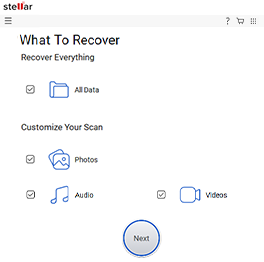
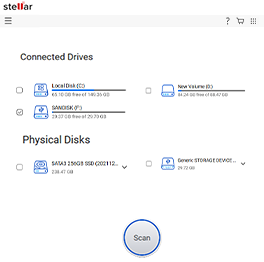
2. What are the steps to recover the photo, music, and video files using the photo recovery software?
Perform the following steps to recover the multimedia files:
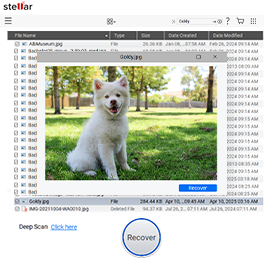
After the scanning is completed, you will see the list of folders indicating each file formats displayed in the left pane.
Select the files that you need to recover
Click on recover selected and provide a suitable destination to save the recovered files.
Photo Recovery Mac - Overview
It is specially designed for MAC users to recover lost, deleted or formatted photos, images, music files, video files with few keystrokes and clicks from your memory cards, digital cameras, hard drives, iPods, memory sticks, hard drives, external drives connected to your Mac machine.
Mac Photo recovery software has been smartly designed to rescue digital files of any format and is compatible with Mac OS X 10.8 Mountain Lion, 10.7 Lion, 10.6 Snow Leopard, 10.5 Leopard, and 10.4.11 Tiger.
* Free Download offers free evaluation of the software & preview all the lost files and folder that can be recovered by the software.
Photo Recovery Mac - Features
* Free Download offers free evaluation of the software & preview all the lost files and folder that can be recovered by the software.
Photo Recovery Mac - Reasons for data loss
A Mac user can lose photos, audio, or videos due to reasons like:
* Free Download offers free evaluation of the software & preview all the lost files and folder that can be recovered by the software.
Photo Recovery Mac - Client Testimonials
Stellar is a perfect amalgamation of quality products and quality services. Never have I come across a data recovery company who follow up individual cases with such precision and care. They made me feel so special.....it's a good feeling.....retrieving those photos from my Mac system was a near impossible prospect ....I had lost all hopes..... Stellar's Mac Photo recovery recovered all my photos .I repeat all my photos with ease and style.... Great job ..Keep it up
Jolen
Stellar Mac photo recovery rocks!!!! I have successfully recovered most of my images after using Stellar's product. It's wonderful. I have recommended it to all my friends. Two of my colleagues have recovered their missing images from their SD Card and memory stick respectively and the excellent turnaround time has transformed them into becoming great fans of Stellar. Stellar personifies great products, great software, great services and quality hospitality....reflects an organization where great minds are at work
David Shapered
Photo Recovery Mac - Faq's
1. Can I use Stellar Phoenix Photo Recovery Software (Mac) to recover photos from a reformatted memory card? If yes, then how?
Yes, Stellar Phoenix Photo Recovery (Mac) can recover deleted photos, audios, and videos from a reformatted memory card. For comprehensive results, make sure that you do not store excess photos/movies/audios continuously to the memory card. Follow the below steps to recover your data:
Note: The similar procedure is followed to recover photos, audios, and videos from all storage media.
2. Photo Recovery Software cannot list my camera. Is something wrong with the software or camera?
Relaunch the software or check your memory card is properly connected using a card reader.
3. Can I use the same media to restore my pictures?
No, doing so can overwrite the data and hence reduce the chances of photo recovery. Also, for the same reason, avoid installing the software on the affected media.
4. Do I need to connect the storage media each time to recover the photos?
No, it is not necessary. You can either create the image of your media using 'Create Image' option or save the scan information. Software stores the media image as an .img file and scan information as .dat file, which can be loaded using 'Resume Recovery' option at the time of recovering photos.
5. I cannot preview some of my files. What's faulty?
The software generally doesn't show you the preview of a file when the file is corrupted beyond recovery or the file format is not supported for preview. However, original recovery results might contain your file.